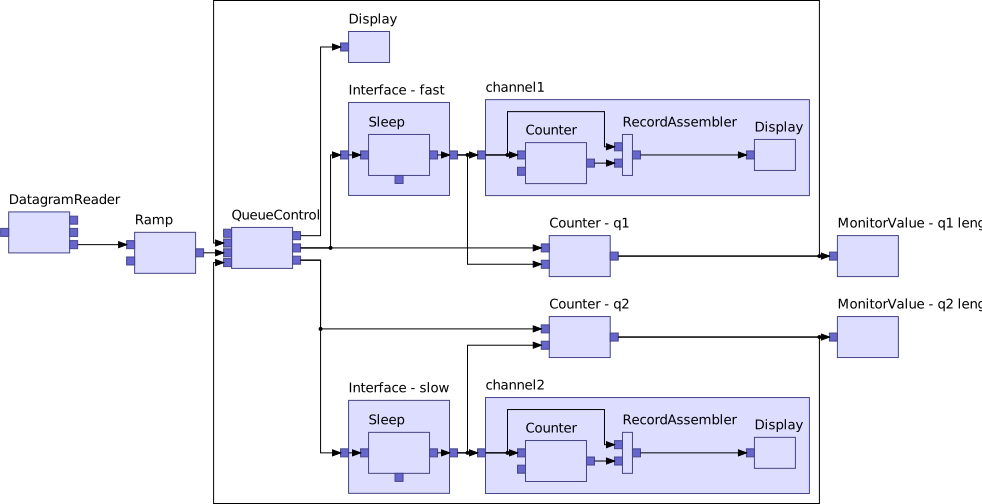

[![npm version](https://badge.fury.io/js/elkjs.svg)](https://badge.fury.io/js/elkjs) The [Eclipse Layout Kernel (ELK)](https://www.eclipse.org/elk/) implements an infrastructure to connect diagram editors or viewers to automatic layout algorithms. This library takes the layout-relevant part of ELK and makes it available to the JavaScript world. ELK's flagship is a layer-based layout algorithm that is particularly suited for node-link diagrams with an inherent direction and ports (explicit attachment points on a node's border). It is based on the ideas originally introduced by Sugiyama et al. An example can be seen in the screenshot below. Note that elkjs is not a diagramming framework itself - it computes positions for the elements of a diagram. elkjs is the successor of [klayjs](https://github.com/kieler/klayjs). #### Demonstrator You can see elkjs [live in action](https://rtsys.informatik.uni-kiel.de/elklive/) in conjunction with TypeFox's [sprotty](https://github.com/eclipse/sprotty) diagramming framework. ![](https://raw.githubusercontent.com/kieler/elkjs/master/doc/example_complexRouter.svg) # FAQs and Recurring Issues The following list includes some recurring topics that may have been addressed in issues already: * [#100][ejs100], [elk#355][e355], [elk#627][e627] - How to consider previous layout results, including * dynamic layout, and * incrementally adding nodes and edges to an existing layout. * [elk#315][e315]: Standalone edge routing. * [#85][ejs85] elkjs itself is a graph layout engine _only_. In other words, no rendering, styling, etc. is provided. * [#127][ejs127], [#141][ejs141], [#142][ejs142] - Issues due to the underlying code transpilation by GWT and/or due to the outdated usage of js modules: * `g is not defined`, * `Can't resolve web-worker`, and * general usage as part of react, webpack, etc. * [#6][ejs6] Poor modularization * Contributions here are welcome! [ejs6]: https://github.com/kieler/elkjs/issues/6 [ejs85]: https://github.com/kieler/elkjs/issues/85 [ejs100]: https://github.com/kieler/elkjs/issues/100 [ejs127]: https://github.com/kieler/elkjs/issues/127 [ejs141]: https://github.com/kieler/elkjs/issues/141 [ejs142]: https://github.com/kieler/elkjs/issues/142 [e315]: https://github.com/eclipse/elk/issues/315 [e355]: https://github.com/eclipse/elk/issues/355 [e627]: https://github.com/eclipse/elk/issues/627 # Installation The latest released version: ```bash npm install elkjs ``` Development version based on ELK's `master` branch. ```bash npm install elkjs@next ``` # Releases and Versioning Releases are partly synchronized with ELK's versions: the minor version number is always the same but the revision number may diverge. For instance, elkjs 0.3.0 equals the functionality of ELK 0.3.0 but elkjs 0.3.2 may be different from ELK 0.3.2. This is necessary as there may be fixes that solely concern elkjs and should be released independently of ELK. # Files The library consists of two main files: * `elk-api.js`: Provides the API and only the API. * `elk-worker.js`: Provides the code that actually knows how to lay out a graph. This is the file that is generated from ELK's Java code base using GWT. Two further files are provided: * `elk.bundled.js`: A bundled version of the two previous files, ready to be dropped into a browser's ` ``` ```html ``` ## Typescript ```ts import ELK from 'elkjs/lib/elk.bundled.js' const elk = new ELK() import ELK from 'elkjs/lib/elk-api' const elk = new ELK({ workerUrl: './elk-worker.min.js' }) ``` ## Debugging For debugging purposes you may want to use the non-minified versions that are available as well. In this case the non-minified webworker version can be configured like so: ```js const ELK = require('elkjs/lib/elk-api.js') const elk = new ELK({ workerFactory: function(url) { // the value of 'url' is irrelevant here const { Worker } = require('elkjs/lib/elk-worker.js') // non-minified return new Worker(url) } }) ``` # API The elkjs library provides a single object: the `ELK`. The `ELK` has a constructor that can be used to construct it: * `new ELK(options)` - the `ELK` can be fed with options, all of which are optional: * `defaultLayoutOptions` - an object with default layout options specified as key/value pairs that are used if no further layout options are passed to the `layout(graph, options)` method (see below). Default: `{}`. * `algorithms` - an array of algorithm ids (only the suffix). Default: `[ 'layered', 'stress', 'mrtree', 'radial', 'force', 'disco' ]`. Note that the `box`, `fixed`, and `random` layouters are always included. * `workerUrl` - a path to the `elk-worker.js` script. As a consequence the `ELK` will use a Web Worker to execute the layout. Default: `undefined`. Apart from that the `ELK` offers the following methods: * `layout(graph, options)` * `graph` - the graph to be laid out in [ELK JSON](http://www.eclipse.org/elk/documentation/tooldevelopers/graphdatastructure/jsonformat.html). Mandatory! * `options` - a configuration object. Optional. * `layoutOptions`: its most important purpose is to pass _global_ layout options. That is, layout options that are applied to every graph element unless the element specifies the option itself. * `logging`: boolean (_since 0.6.0_). Whether logging information shall be passed back as part of the laid out graph. `false` by default. * `measureExecutionTime`: boolean (_since 0.6.0_). Whether execution time (in seconds) information shall be passed back as part of the laid out graph. `false` by default. * returns a `Promise`, which passes either the laid out graph on success or a (hopefully helpful) error on failure. * `knownLayoutOptions()` * returns an array of of known layout options. For each option additional information such as its `id` and `group` is given. * `knownLayoutAlgorithms()` * returns an array of registered layout algorithms (see above) alongside further information about each algorithm. * `knownLayoutCategories()` * returns an array of registered layout categories. * `terminateWorker()` - in case a Web Worker is used, the worker's `terminate()` method is called. The three methods starting with `known` basically return information that, in the Java world, would be retrieved from the [`LayoutMetaDataService`](http://www.eclipse.org/elk/documentation/algorithmdevelopers/metadatalanguage.html). # Logging and Execution Times (_Since 0.6.0_) ELK provides some means to log debug information during layout algorithm execution. The details can be found in the [_Algorithm Debugging_](https://www.eclipse.org/elk/documentation/algorithmdevelopers/algorithmdebugging.html) section of ELK's documentation. Not all of it is available in elkjs though, for instance, it is not possible to save intermediate results of the laid out graphs. Furthermore, while internally execution time is measured in _nanoseconds_ on the Java side, in elkjs we have to resort to _milliseconds_. Note that the returned execution times are in seconds. For small graphs this may often result in execution times being reported as `0`. See below an example call and the example output. ```js elk.layout(simpleGraph, { layoutOptions: { 'algorithm': 'layered' }, logging: true, measureExecutionTime: true }) ``` ```js { "id": "root", "children": [ ... ], "edges": [ ... ], "logging": { "name": "Recursive Graph Layout", "executionTime": 0.000096, "children": [ { "name": "Layered layout", "logs": [ "ELK Layered uses the following 17 modules:", " Slot 01: org.eclipse.elk.alg.layered.p1cycles.GreedyCycleBreaker", [ ... ] " Slot 16: org.eclipse.elk.alg.layered.intermediate.ReversedEdgeRestorer" ], "executionTime": 0.000072, "children": [ { "name": "Greedy cycle removal", "executionTime": 0.000002 }, [ ... ] { "name": "Restoring reversed edges", "executionTime": 0 } ] } ] } } ``` # Building [![Open in Gitpod](https://gitpod.io/button/open-in-gitpod.svg)](https://gitpod.io/#https://github.com/kieler/elkjs) For building, a checkout of the [ELK](https://github.com/eclipse/elk) repository is required and should be located in the same directory as the checkout of this repository. Like so: ``` some_dir/ ├── elkjs └── elk ``` ```bash npm install npm run build ``` For a new release, the following version numbers have to be changed: * `version` in `package.json`, * `melk` in `build.gradle`, and * don't forget to checkout the correct release tag of ELK's repository. Afterwards you can find the created files in the `lib` folder. Current procedure ```bash git checkout -b releases/0.x.x # Check that the version numbers are correct, if necessary update versions and commit the changes npm install npm run build npm run test # Add ./lib/ directory and commit git tag 0.x.x # Push release branch and tags to remote git push --tags --set-upstream origin releases/0.x.x # Create a new release on Github for the new tag and afterwards publish to npm npm publish --tag=latest ``` Afterwards the following version numbers have to be changed to the next release number: * `version` in `package.json`, * `melk` in `build.gradle`. ## Incorrect npm tags Incorrectly tagged versions on npm can be updated with `npm dist-tag add elkjs@ `. # Links In the following a list of asorted links to other projects and sites that may prove helpful: * [Execution time comparison to Java ELK](https://github.com/kieler/elk-speed) * How to specify [node label placement](http://kieler.github.io/klayjs-d3/examples/node_labels/) * How to enforce certain [node positioning](http://kieler.github.io/klayjs-d3/examples/interactive/) (topological) # Example Users of elkjs - Schematics - [netlistsvg](https://github.com/nturley/netlistsvg) - electronic and gate level schematics as SVG - [d3-hwschematic](https://github.com/Nic30/d3-hwschematic) - interactive digital circuit analysis and documentation, particularly for FPGA-based designs - Cytoscape [adapter](https://github.com/cytoscape/cytoscape.js-elk) - [reaflow](https://reaflow.dev) - Node-based editor built on elkjs in React - [reactflow](https://reactflow.dev) - React component for building node-based editors and interactive diagrams - Wrapping elkjs into a [docker-based microservice](https://github.com/elbosso/elkjsmicroservice) - [sprotty](https://github.com/eclipse/sprotty) - A diagramming framework - [Eclipse 4diac](https://www.fordiac.org) - [capellambse-context-diagrams](https://github.com/DSD-DBS/capellambse-context-diagrams) - Generating systems engineering context diagrams for [Capella](https://www.eclipse.org/capella/) in Python - Used to layout the [dataflow viewer](https://github.com/vega/editor/pull/1023) in the [Vega Editor](https://vega.github.io/editor/#/) Note: We are happy to extend this list further, so please contact us if you have a project to add # Thanks * [@automata](https://github.com/automata) for the very first `klayjs` version * [@aranega](https://github.com/aranega) for making emfgwt work for us * [@EyMaddis](https://github.com/EyMaddis) for valuable API discussions * The team working on the layout algorithms * [@spoenemann](https://github.com/spoenemann) * [@le-cds](https://github.com/le-cds) * [@uruuru](https://github.com/uruuru) * [@eNBeWe](https://github.com/eNBeWe) * the vast number of students that contributed to ELK